News Elementor – News WordPress Theme 2023. Powered By BlazeThemes.
Web Development
Why Accessibility Testing During Website Development Should Start Earlier
Tyler Grayson
April 7, 2025
Most website projects begin with excitement. Teams map out features, approve designs, and move quickly into development. Accessibility, however, often ends up as something to “check later.” By the time testing begins, the website is nearly complete, making even small accessibility issues surprisingly expensive to fix.
That approach creates unnecessary work for everyone involved. Accessibility testing during website development works best when it’s treated as part of the process rather than the finish line. Building accessibility into every stage helps teams avoid rework, create a better user experience, and launch with greater confidence.
Accessibility Isn’t Something You Add at the End
Accessibility isn’t just about meeting compliance requirements. It’s about ensuring every visitor can navigate, understand, and interact with your website, whether they use a keyboard, a screen reader, voice commands, or other assistive technologies.
When accessibility is left until the final review, developers often discover structural problems that affect navigation, forms, headings, and interactive elements. These aren’t quick fixes. They usually require code changes, design revisions, and additional quality assurance before launch.
Starting website accessibility testing earlier changes that. Instead of identifying problems after they’re embedded throughout the project, teams catch them while features are still being designed and developed.
The Cost of Waiting Adds Up Quickly
One overlooked accessibility issue rarely stays isolated. A missing heading structure, poor color contrast, or inaccessible form pattern can repeat across dozens of pages.
Fixing those issues late means revisiting design files, updating components, rewriting code, and repeating testing cycles. That increases development time while delaying releases.
Beginning accessibility testing during website development significantly reduces this effort. Teams address issues while they’re still working on the feature, keeping changes smaller, cleaner, and easier to manage.
It also prevents what’s often called accessibility debt. Similar to technical debt, accessibility debt builds up when teams postpone inclusive design decisions. Eventually, those shortcuts become expensive to correct.
What Early Accessibility Testing Actually Catches
Testing throughout development helps uncover issues long before they affect users.
Navigation and Keyboard Accessibility
Many people browse websites without a mouse. Logical keyboard navigation, visible focus indicators, and predictable menus allow users to move comfortably through every page.
Early testing quickly highlights navigation patterns that may confuse keyboard users before they become part of the entire website.
Forms and Interactive Elements
Forms often contain hidden accessibility problems. Missing labels, unclear error messages, and inaccessible dropdown menus can make completing simple tasks frustrating.
Reviewing these elements during development ensures forms remain usable for everyone instead of requiring extensive fixes later.
Color Contrast and Readability
Design choices that look attractive may not always provide enough contrast for comfortable reading.
Checking color combinations, typography, and visual hierarchy during design helps create content that’s easier to read across different devices, lighting conditions, and user needs.
Semantic Structure
Semantic HTML provides meaning beyond appearance. Proper heading hierarchy, lists, landmarks, and descriptive buttons help screen readers interpret content accurately while improving overall website organization.
These improvements also support stronger website accessibility compliance and make future maintenance simpler.
Accessibility Improves More Than Compliance
Many teams associate accessibility only with regulations like WCAG, ADA, or Section 508. While compliance certainly matters, accessibility delivers broader benefits that improve the entire website.
Search engines reward well-structured pages because web crawlers interpret content similarly to assistive technologies. Clear heading structures, descriptive alternative text, meaningful links, and semantic HTML contribute to better indexing while improving the experience for real users.
Accessibility also creates cleaner codebases. Developers spend less time creating patches because inclusive practices become part of everyday development rather than emergency fixes before launch.
For businesses, that means fewer delays, smoother quality assurance, and websites that continue performing well as new features are added.
Building Accessibility Into Your Development Workflow
Successful teams don’t treat accessibility as a separate project. They make it part of every milestone.
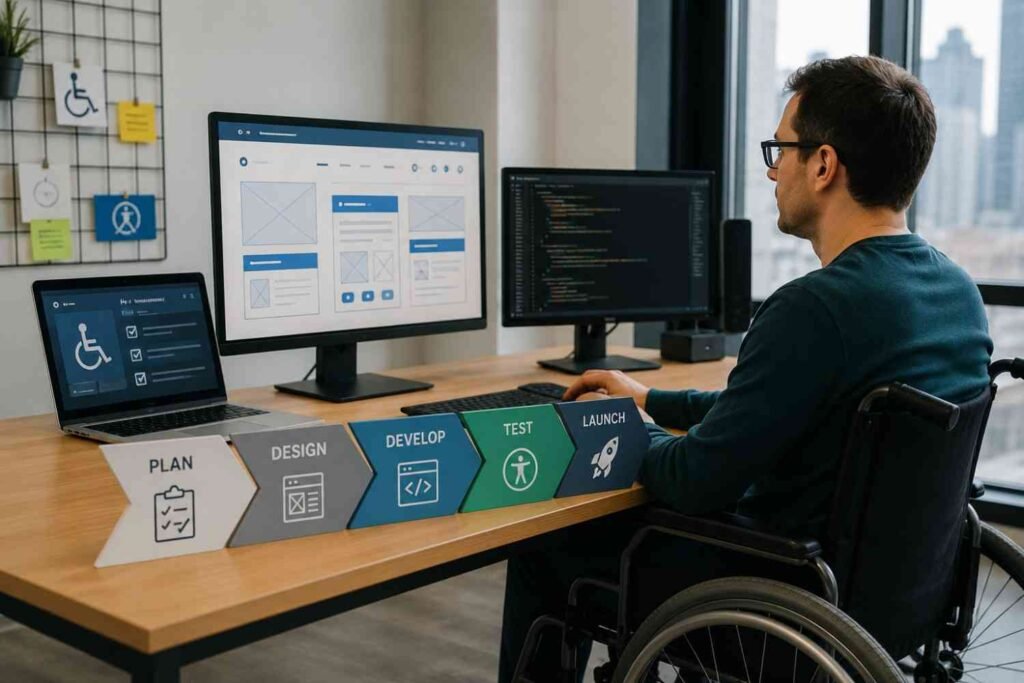
Planning is the ideal time to define accessibility goals, user needs, and WCAG compliance targets. During design, reviewing contrast ratios, focus states, and page layouts prevents visual issues from reaching development.
As developers begin coding, semantic HTML, ARIA attributes where appropriate, automated linting, and regular website accessibility testing help identify problems early. Many teams also combine these practices with adaptive website development techniques, making accessibility considerations a natural part of creating flexible, user-friendly experiences instead of an afterthought.
Continuous integration pipelines can automatically scan new code before deployment, reducing the chances of accessibility regressions reaching production.
Rather than slowing development, this workflow often speeds it up because developers solve smaller problems continuously instead of facing dozens of issues at the end.
Automated Tools Help, but People Complete the Picture
Modern accessibility testing tools are incredibly valuable. Solutions like axe DevTools, Lighthouse, WAVE, and design plugins quickly identify common accessibility issues during development.
Automated testing can detect missing alternative text, insufficient color contrast, incorrect heading structures, and other common problems within seconds.
However, automation doesn’t replace human evaluation.
Manual accessibility testing remains essential for reviewing keyboard navigation, screen reader compatibility, logical reading order, interactive widgets, and overall usability. Real people experience websites differently than automated scanners, making both approaches necessary for a complete accessibility testing process.
The strongest development teams combine automated scans with manual reviews throughout the project instead of relying on either method alone.
Frequently Asked Questions: Why Accessibility Testing During Website Development Should Start Earlier
1. When should accessibility testing begin during website development?
Accessibility testing should begin during planning and continue through design, development, testing, and deployment. Starting early helps identify issues before they become expensive to fix.
2. Can automated accessibility testing replace manual testing?
No. Automated tools detect many common issues, but manual testing is still necessary to evaluate keyboard navigation, screen reader compatibility, usability, and complex interactive components.
3. Does accessibility testing improve SEO?
Yes. Semantic HTML, descriptive alternative text, logical heading structures, and improved content organization support both accessibility and search engine indexing while creating a better user experience.
4. What standards should development teams follow?
Most teams use the Web Content Accessibility Guidelines (WCAG), along with applicable legal requirements such as ADA and Section 508, depending on their organization and audience.
Better Websites Start With Better Decisions
The strongest websites aren’t the ones that pass accessibility checks right before launch. They’re the ones that consider accessibility from the very beginning. Every decision made during planning, design, and development shapes how people experience a website later. Small improvements made early prevent larger problems, reduce technical overhead, and create digital experiences that work for more people without constant revisions.
Accessibility isn’t another task waiting at the end of a project. It’s one of the smartest decisions a development team can make from day one.
Most website projects begin with excitement. Teams map out features, approve designs, and move quickly into development. Accessibility, however, often ends up as something to “check later.” By the time testing begins, the website is nearly complete, making even small accessibility issues surprisingly expensive to fix.
That approach creates unnecessary work for everyone involved. Accessibility testing during website development works best when it’s treated as part of the process rather than the finish line. Building accessibility into every stage helps teams avoid rework, create a better user experience, and launch with greater confidence.
Accessibility Isn’t Something You Add at the End
Accessibility isn’t just about meeting compliance requirements. It’s about ensuring every visitor can navigate, understand, and interact with your website, whether they use a keyboard, a screen reader, voice commands, or other assistive technologies.
When accessibility is left until the final review, developers often discover structural problems that affect navigation, forms, headings, and interactive elements. These aren’t quick fixes. They usually require code changes, design revisions, and additional quality assurance before launch.
Starting website accessibility testing earlier changes that. Instead of identifying problems after they’re embedded throughout the project, teams catch them while features are still being designed and developed.
The Cost of Waiting Adds Up Quickly
One overlooked accessibility issue rarely stays isolated. A missing heading structure, poor color contrast, or inaccessible form pattern can repeat across dozens of pages.
Fixing those issues late means revisiting design files, updating components, rewriting code, and repeating testing cycles. That increases development time while delaying releases.
Beginning accessibility testing during website development significantly reduces this effort. Teams address issues while they’re still working on the feature, keeping changes smaller, cleaner, and easier to manage.
It also prevents what’s often called accessibility debt. Similar to technical debt, accessibility debt builds up when teams postpone inclusive design decisions. Eventually, those shortcuts become expensive to correct.
What Early Accessibility Testing Actually Catches
Testing throughout development helps uncover issues long before they affect users.
Navigation and Keyboard Accessibility
Many people browse websites without a mouse. Logical keyboard navigation, visible focus indicators, and predictable menus allow users to move comfortably through every page.
Early testing quickly highlights navigation patterns that may confuse keyboard users before they become part of the entire website.
Forms and Interactive Elements
Forms often contain hidden accessibility problems. Missing labels, unclear error messages, and inaccessible dropdown menus can make completing simple tasks frustrating.
Reviewing these elements during development ensures forms remain usable for everyone instead of requiring extensive fixes later.
Color Contrast and Readability
Design choices that look attractive may not always provide enough contrast for comfortable reading.
Checking color combinations, typography, and visual hierarchy during design helps create content that’s easier to read across different devices, lighting conditions, and user needs.
Semantic Structure
Semantic HTML provides meaning beyond appearance. Proper heading hierarchy, lists, landmarks, and descriptive buttons help screen readers interpret content accurately while improving overall website organization.
These improvements also support stronger website accessibility compliance and make future maintenance simpler.
Accessibility Improves More Than Compliance
Many teams associate accessibility only with regulations like WCAG, ADA, or Section 508. While compliance certainly matters, accessibility delivers broader benefits that improve the entire website.
Search engines reward well-structured pages because web crawlers interpret content similarly to assistive technologies. Clear heading structures, descriptive alternative text, meaningful links, and semantic HTML contribute to better indexing while improving the experience for real users.
Accessibility also creates cleaner codebases. Developers spend less time creating patches because inclusive practices become part of everyday development rather than emergency fixes before launch.
For businesses, that means fewer delays, smoother quality assurance, and websites that continue performing well as new features are added.
Building Accessibility Into Your Development Workflow
Successful teams don’t treat accessibility as a separate project. They make it part of every milestone.
Planning is the ideal time to define accessibility goals, user needs, and WCAG compliance targets. During design, reviewing contrast ratios, focus states, and page layouts prevents visual issues from reaching development.
As developers begin coding, semantic HTML, ARIA attributes where appropriate, automated linting, and regular website accessibility testing help identify problems early. Many teams also combine these practices with adaptive website development techniques, making accessibility considerations a natural part of creating flexible, user-friendly experiences instead of an afterthought.
Continuous integration pipelines can automatically scan new code before deployment, reducing the chances of accessibility regressions reaching production.
Rather than slowing development, this workflow often speeds it up because developers solve smaller problems continuously instead of facing dozens of issues at the end.
Automated Tools Help, but People Complete the Picture
Modern accessibility testing tools are incredibly valuable. Solutions like axe DevTools, Lighthouse, WAVE, and design plugins quickly identify common accessibility issues during development.
Automated testing can detect missing alternative text, insufficient color contrast, incorrect heading structures, and other common problems within seconds.
However, automation doesn’t replace human evaluation.
Manual accessibility testing remains essential for reviewing keyboard navigation, screen reader compatibility, logical reading order, interactive widgets, and overall usability. Real people experience websites differently than automated scanners, making both approaches necessary for a complete accessibility testing process.
The strongest development teams combine automated scans with manual reviews throughout the project instead of relying on either method alone.
Frequently Asked Questions: Why Accessibility Testing During Website Development Should Start Earlier
1. When should accessibility testing begin during website development?
Accessibility testing should begin during planning and continue through design, development, testing, and deployment. Starting early helps identify issues before they become expensive to fix.
2. Can automated accessibility testing replace manual testing?
No. Automated tools detect many common issues, but manual testing is still necessary to evaluate keyboard navigation, screen reader compatibility, usability, and complex interactive components.
3. Does accessibility testing improve SEO?
Yes. Semantic HTML, descriptive alternative text, logical heading structures, and improved content organization support both accessibility and search engine indexing while creating a better user experience.
4. What standards should development teams follow?
Most teams use the Web Content Accessibility Guidelines (WCAG), along with applicable legal requirements such as ADA and Section 508, depending on their organization and audience.
Better Websites Start With Better Decisions
The strongest websites aren’t the ones that pass accessibility checks right before launch. They’re the ones that consider accessibility from the very beginning. Every decision made during planning, design, and development shapes how people experience a website later. Small improvements made early prevent larger problems, reduce technical overhead, and create digital experiences that work for more people without constant revisions.
Accessibility isn’t another task waiting at the end of a project. It’s one of the smartest decisions a development team can make from day one.
It is a long established fact that a reader will be distracted by the readable content of a page when looking at its layout. The point of using Lorem Ipsum is that it has a more-or-less normal distribution of letters, as opposed to using ‘Content here, content here’, making it look like readable English. Many desktop publishing packages and web page editors now use Lorem Ipsum as their default model text, and a search for ‘lorem ipsum’ will uncover many web sites still in their infancy.
It is a long established fact that a reader will be distracted by the readable content of a page when looking at its layout. The point of using Lorem Ipsum is that it has a more-or-less normal distribution of letters, as opposed to using ‘Content here, content here’, making it look like readable English. Many desktop publishing packages and web page editors now use Lorem Ipsum as their default model text, and a search for ‘lorem ipsum’ will uncover many web sites still in their infancy.
The point of using Lorem Ipsum is that it has a more-or-less normal distribution of letters, as opposed to using ‘Content here, content here’, making
The point of using Lorem Ipsum is that it has a more-or-less normal distribution of letters, as opposed to using ‘Content here, content here’, making it look like readable English. Many desktop publishing packages and web page editors now use Lorem Ipsum as their default model text, and a search for ‘lorem ipsum’ will uncover many web sites still in their infancy.
It is a long established fact that a reader will be distracted by the readable content of a page when looking at its layout. The point of using Lorem Ipsum is that it has a more-or-less normal distribution