Don’t Get Sued: How to Setup Cookie Consent Banner?
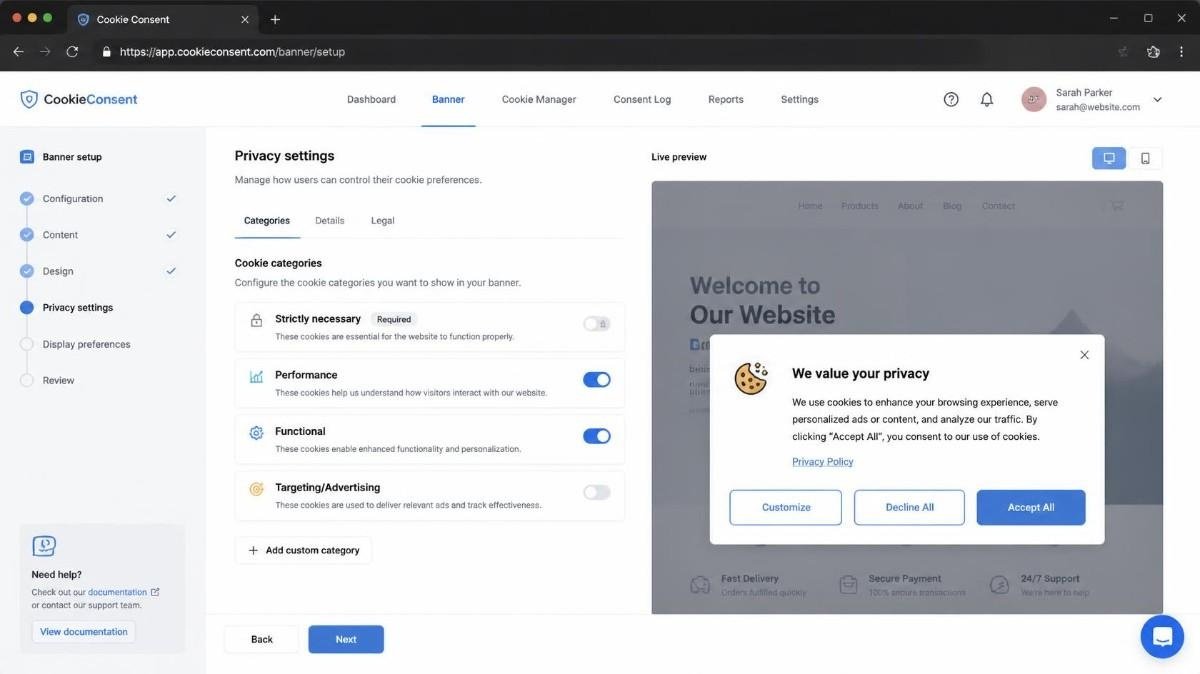
Building websites taught me that nothing disrupts a smooth site launch quite like privacy compliance panic. Running into unexpected compliance issues during a site audit forced a deep dive into privacy tools, and figuring out how to setup cookie consent banner functionality turned out to be far simpler than expected.
Managing a modern website involves balancing smooth user experience with legal requirements. Visitor privacy regulations are strict, making a consent banner essential rather than optional. Setting up a cookie banner properly keeps your site compliant and protects your analytical data without ruining your layout.
Key Takeaways
- Setting up a banner protects your site from hefty regulatory privacy fines.
- Google Consent Mode v2 integration keeps your analytics active and compliant.
- Auto-scanning cookies ensures scripts are blocked before users grant consent.
- Simple no-code plugins or single-line JavaScript embeds make setup fast.
- Clear opt-in and opt-out choices boost user trust and retention.
The Importance of Cookie Consent
Understanding web compliance rules helps you choose the right banner configuration for your audience.
Privacy laws vary by region, but they all focus on giving visitors control over their personal data. The European Union GDPR requires strict opt-in consent before firing non-essential tracking scripts. In contrast, US laws like California CCPA focus on giving users clear opt-out choices and “Do Not Sell” options.
Ignoring these rules can cause analytics tracking loss, ad network suspensions, or significant financial penalties. Website owners must inform users about tracking cookies, explain their purpose, and store verifiable consent logs. Setting up a proper consent manager ensures your web server and ad scripts stay compliant globally.
Essential Rules for Modern Web Masters
Regulations require clear explanations of what data your site collects through cookies. Your consent banner must feature equal choices, meaning “Reject All” needs to be as visible as “Accept All.” Blocking scripts automatically before a user clicks accept is vital for GDPR compliance. Adding a direct link to your privacy policy ensures complete legal transparency for every site visitor.
Navigating Opt-In Versus Opt-Out Requirements
Different traffic origins demand different consent modes across your global web pages. Opt-in consent requires all tracking tags to stay paused until a visitor explicitly grants permission. Opt-out consent allows non-sensitive cookies to load immediately while giving users a clear way to turn them off. Smart consent platforms adjust their layout automatically based on the visitor location.
Essential Elements of a Compliant Consent Banner
A great banner strikes a balance between legal compliance and clean design aesthetics.
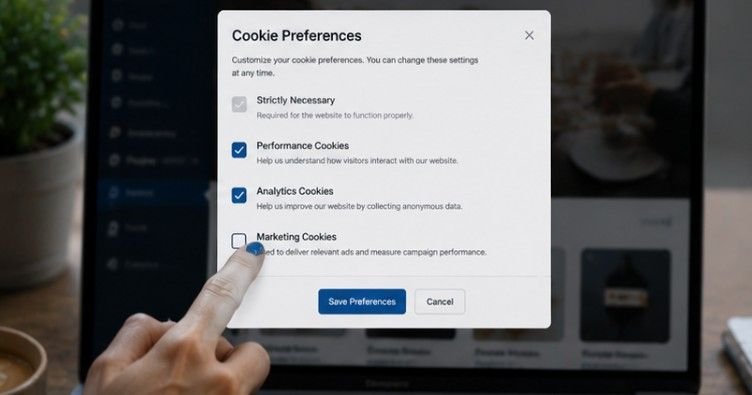
Dark patterns that trick users into accepting cookies can trigger heavy regulatory fines. Modern banners use clear language, high-contrast buttons, and organized cookie preference categories. Keeping your consent banner clean maintains your site design while meeting all web standards.
Your banner needs granular controls so visitors can toggle specific tracking types like marketing or analytics. Storing consent records securely in user local storage or database logs provides audit proof. Offering an easy way for visitors to update their preferences later keeps your site fully compliant.
Crafting User-Friendly Consent Copy
Transparent language helps build immediate trust with your website visitors. Avoid confusing legal terms and explain clearly why your site uses cookies for functionality. Use straightforward labels on your buttons like “Accept All,” “Reject Non-Essential,” and “Manage Settings.” Friendly, direct messaging improves accept rates while keeping your privacy practices fully transparent.
Balancing Design and Website Usability
Your banner should match your brand style without blocking vital site navigation. Choose subtle slide-ins or bottom bars rather than aggressive full-screen popups that annoy users. Use brand colors for your action buttons while maintaining high contrast for web accessibility. Mobile responsiveness is critical, so ensure your banner scales cleanly across small phone screens.
Technical Setup Methods for Every Website Stack
Adding a banner to your web stack depends on your CMS platform and technical experience. Website platforms offer specialized plugins that handle cookie scanning and banner rendering automatically. Custom HTML sites can embed lightweight JavaScript snippets into the website header template easily.
Whichever route you select, testing script execution in your browser console ensures tracking pauses correctly.
Implementing via WordPress and Popular CMS Plugins
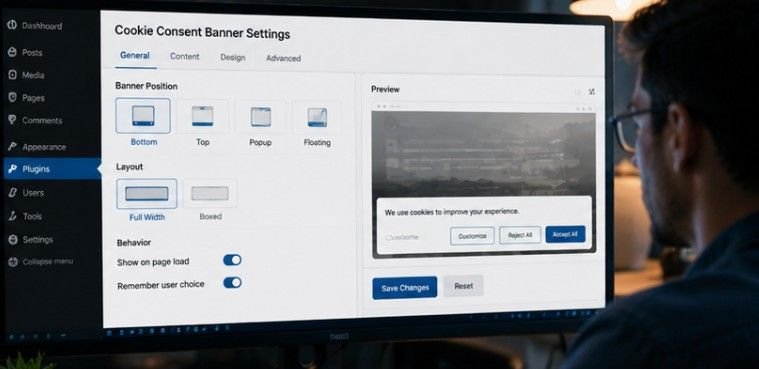
Content management systems make installing a consent banner simple through dedicated plugins if routine website maintenance is done.
Popular tools like CookieYes, Complianz, and Cookiebot handle technical setup without requiring manual code edits. Search your plugin directory, install your chosen compliance tool, and run an initial cookie scan. Configure your banner appearance, set your legal preferences, and save changes to push the banner live.
Manual JavaScript and Google Tag Manager Integration
Custom code setups provide complete control over script blocking and site loading speed & performance.
Copy the JavaScript code snippet provided by your Consent Management Platform (CMP). Paste this code into the <head> section of your website HTML before any other scripts load. Using Google Tag Manager allows you to trigger tracking tags dynamically based on user consent states.
How to Setup Cookie Consent Banner on Any Platform
Following a structured process guarantees your consent banner functions properly across your entire site.

Choose a Consent Platform
Selecting a reliable provider gives you the tracking tools needed for legal compliance. Pick a trusted provider like Cookiebot, CookieYes, or Usercentrics based on your budget and site traffic. Sign up and register your website domain name on their main platform dashboard. Configure your regional compliance settings such as GDPR for Europe or CCPA for the United States.
Install the Banner on Your Site
Deploying the tracking code connects your website directly to your management platform. If you use WordPress, Wix, or Shopify, install the official privacy plugin and enter your account ID. For Google Tag Manager setups, add a consent template from the community gallery, enter your project ID, and set the trigger to Consent Initialization on all pages.
For manual code setups, copy the provided script and paste it into the <head> section of your website HTML.
Customize and Test
Tailoring your visual layout ensures everything functions properly before going live to visitors. Style the banner colors, text copy, and action buttons to match your specific brand identity. Turn on explicit consent options so tracking scripts stay completely blocked until the user agrees. Open an incognito browser window to verify the banner appears correctly and blocks or allows cookies based on your choices.
Frequently Asked Questions
1. How to implement a cookie consent banner?
You can implement a cookie consent banner by signing up with a trusted provider like Cookiebot or CookieYes. Register your domain, configure your regional privacy settings, install the official plugin or paste the code snippet into your website header, and test the banner live.
2. Do I need a cookie consent banner on my website?
Yes, you need a banner if your website uses tracking scripts, analytics, or third-party cookies and receives visitors from regions with strict privacy laws like GDPR or CCPA. Banners protect your business from legal fines and maintain user trust across web channels.
3. How to enable cookie consent?
To enable cookie consent, install a consent management platform plugin on your CMS or embed a script into your HTML header. Configure the software to block non-essential tracking cookies automatically until the visitor explicitly clicks accept or selects their preferred privacy settings.
4. What should the cookie consent banner comprise of?
A compliant banner must feature clear notice text, equal Accept and Reject buttons, granular category toggles, Google Consent Mode v2 integration, and a direct link to your privacy policy. It should also store consent records and allow users to change settings later.
5. How to setup cookie consent banner in Google Tag Manager?
Install a community consent template inside Tag Manager and enter your platform project ID. Set your tag triggers to Consent Initialization for all pages, configure default consent states, and test your tags in Preview Mode to ensure non-essential scripts stay paused until consent is granted.
Mastering Cookie Compliance
Mastering how to setup cookie consent banner functionality protects your web properties while building user trust. Combining automated cookie scanning with Google Consent Mode v2 keeps your tracking data accurate and legally safe. Update your cookie policies regularly as privacy laws evolve to keep your website compliant, fast, and user-friendly.