Planning a Website Development Workflow for Better Team Collaboration
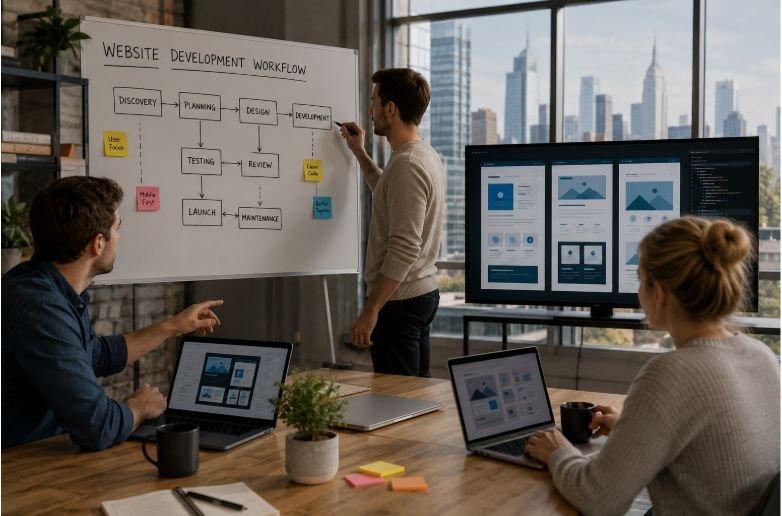
Website projects rarely go off track because someone forgot how to code. More often, delays happen when expectations aren’t clear, feedback gets scattered across emails, or teams start working before everyone agrees on the plan. Even a talented group of designers, developers, content writers, and project managers can struggle if they’re not working from the same playbook.
That’s why planning a website development workflow is about much more than creating a project timeline. It’s about building a process that keeps communication clear, responsibilities defined, and every stage connected from the first meeting to post-launch improvements.
When collaboration becomes part of the workflow, projects move faster, revisions become more manageable, and the final website reflects everyone’s best work.
Why Every Website Project Needs a Defined Workflow

A website development process involves many moving parts. Designers focus on user experience, developers build functionality, content teams prepare messaging, and stakeholders provide approvals. Without a structured workflow, even small misunderstandings can create unnecessary delays.
A well-planned workflow gives every team member visibility into project milestones, deadlines, and responsibilities. It also reduces scope creep by documenting objectives early, making it easier to evaluate new requests without disrupting the project timeline.
Beyond keeping projects organized, a collaborative workflow encourages better decision-making. Teams can identify challenges sooner, resolve issues before they grow, and maintain steady progress without relying on constant status meetings.
Building a Website Development Workflow That Supports Collaboration
Start With Clear Goals and Project Requirements
Every successful website begins with clarity. Before anyone opens a design tool or writes a line of code, the team should understand why the website is being built and what success looks like.
A project charter helps establish business objectives, target users, project scope, timelines, and measurable outcomes. This shared understanding prevents conflicting priorities later in the website development lifecycle.
It’s also the right time to decide on technical requirements. Selecting a content management system (CMS), hosting environment, development framework, integrations, and third-party services early helps prevent unexpected technical roadblocks during development.
Build the Information Architecture Before Designing
Jumping straight into visual design often creates unnecessary revisions. Instead, teams should first organize the site’s structure through a detailed sitemap and user journey planning.
Information architecture helps everyone understand how visitors will move through the website. It identifies page relationships, navigation paths, and content hierarchy before visual elements enter the discussion.
When writers, designers, and developers collaborate at this stage, the website design workflow becomes much smoother because everyone is working from the same foundation.
Turn Ideas Into Interactive Designs
Wireframes provide the first visual representation of the website without focusing on colors or branding. They allow teams to review layout, functionality, and content placement while changes are still easy to make.
Once wireframes are approved, interactive prototypes help simulate the user experience before development begins. Collaborative platforms like Figma make it easier for stakeholders to leave comments directly on specific components instead of sending lengthy email chains.
This approach keeps feedback organized, reduces misunderstandings, and prevents multiple versions of the same design from circulating across the team.
Connect Design and Development From Day One
One of the biggest collaboration challenges appears during design handoff. Designers may assume certain interactions are easy to build, while developers discover technical limitations only after work has begun.
Following Secure Website Deployment Strategies That Help Prevent Costly Mistakes—such as staging environments, version control, automated testing, and pre-launch security checks—helps teams identify issues early, reduce deployment risks, and ensure that design and development changes are released smoothly without introducing avoidable errors or security vulnerabilities.
Shared design systems, documented component libraries, and consistent naming conventions create a common language that benefits everyone involved. Rather than treating design and development as separate phases, they become connected parts of a single website development project.
At this stage, website development workflow documentation becomes especially valuable because it gives every contributor a clear reference point instead of relying on memory or scattered conversations.
Engineering Practices That Keep Teams Aligned

Strong collaboration continues throughout development by following consistent engineering practices.
Using Git version control ensures every code change is tracked and reviewed. Feature branches, pull requests, and peer reviews improve code quality while encouraging knowledge sharing across the development team.
Separate local, staging, and production environments also reduce deployment risks. Developers can test new functionality safely before changes reach live users, making the entire web development workflow more predictable.
These practices support better teamwork because everyone understands where work belongs, how changes move through the pipeline, and when features are ready for testing.
Testing Should Be a Team Effort
Quality assurance isn’t just the responsibility of testers. Designers, developers, content creators, SEO specialists, and stakeholders all contribute valuable perspectives before launch.
Teams should verify:
- Responsive design across different screen sizes and devices
- Browser compatibility and functional testing
- Accessibility standards and semantic markup
- Website speed and Core Web Vitals
- Form submissions, navigation, and interactive elements
- SEO essentials such as metadata, structured content, and crawlability
Centralized bug reporting tools make collaboration easier by attaching feedback directly to webpage elements instead of relying on screenshots or vague descriptions.
Testing together helps identify issues earlier, reducing expensive fixes after launch.
Frequently Asked Questions: Planning a Website Development Workflow for Better Team Collaboration
What is a website development workflow?
A website development workflow is a structured process that guides a website project from planning and design through development, testing, launch, and ongoing maintenance while keeping every team member aligned.
Why is collaboration important during website development?
Collaboration reduces misunderstandings, improves communication, speeds up approvals, and helps designers, developers, content creators, and stakeholders work toward shared project goals.
Which tools help improve website development collaboration?
Teams commonly use project management platforms, Figma for design collaboration, Git for version control, shared documentation tools, and bug tracking software to streamline communication.
How often should a website development workflow be reviewed?
Teams should review their workflow after every major project or website launch to identify bottlenecks, improve communication, and refine future development processes.
Better Collaboration Begins Before the First Line of Code
The strongest website projects don’t happen because one person does exceptional work. They succeed because every contributor understands the plan, communicates effectively, and works within a process that supports collaboration from beginning to end.
Planning a website development workflow creates that foundation, allowing teams to spend less time resolving confusion and more time building experiences that serve both users and business goals.
When collaboration becomes part of the workflow instead of an afterthought, every project becomes easier to manage, easier to improve, and far more likely to succeed.